> ## Documentation Index
> Fetch the complete documentation index at: https://docs.spurdoverse.app/llms.txt
> Use this file to discover all available pages before exploring further.
# Render
> Shapes, text and images on the overlay, plus world-to-screen.
Immediate-mode 2D drawing on the overlay, in screen pixels with the origin at the top-left.
```ts theme={null}
import render from "@native/render";
```
Draw calls only work inside an `on("render")` listener. Anywhere else (a `tick`, a timer, after
an `await`) they throw. Queries (`measureText`, `worldToScreen`, `screenTransform`, `boundsOf`,
`screenSize`) work anywhere.
## Overview
`line`, `rect`, `circle`, `triangle`, `polyline` and their filled versions.
`text`, `measureText`, `image`, fonts.
`screenSize`, `worldToScreen`, `screenTransform`, `boundsOf`.
Positions are [Vec2Like](/api/types/vector2): `[x, y]`, `{ x, y }` or a `Vector2`. Colors are
[ColorLike](/api/types/color) and always required: `"#ff4040"`, `[255, 64, 64, 200]`, a `Color`
or a packed `0xAABBGGRR`. The last argument is an optional options object.
```ts theme={null}
on("render", () => {
render.line([10, 10], [200, 10], "#fff", { thickness: 2 });
render.rect([10, 20], [200, 60], Color.red(), { thickness: 1.5, rounding: 4 });
render.text([16, 28], "hello", "#fff", { size: 16, font: "segoe-bold", outline: true });
});
```
***
## Shapes
| Call | Options |
| :- | :- |
| `line(from, to, color, options?)` | `thickness` |
| `rect(min, max, color, options?)` | `thickness`, `rounding` |
| `rectFilled(min, max, color, options?)` | `rounding` |
| `rectGradient(min, max, from, to, options?)` | `direction` |
| `circle(center, radius, color, options?)` | `thickness`, `segments` |
| `circleFilled(center, radius, color, options?)` | `segments` |
| `triangle(a, b, c, color, options?)` | `thickness` |
| `triangleFilled(a, b, c, color)` | |
| `polyline(points, color, options?)` | `thickness`, `closed` |
| `polygonFilled(points, color)` | |
| Option | Default | |
| :- | :- | :- |
| `thickness` | `1` | Line width in pixels. |
| `rounding` | `0` | Corner radius in pixels. |
| `segments` | `0` | `0` picks a count from the radius. |
| `closed` | `false` | Connects the last point back to the first. |
| `direction` | `"horizontal"` | `"horizontal"` blends `from` left to `to` right, `"vertical"` top to bottom. |
`polyline` needs at least 2 points, `polygonFilled` at least 3.
```ts theme={null}
on("render", () => {
const { x: w, y: h } = render.screenSize;
render.circle([w / 2, h / 2], 60, "#ffffff80");
render.rectGradient([10, 50], [210, 56], "#ff0000", "#0000ff");
render.polyline([[0, 0], [50, 20], [100, 0]], "#0f0", { closed: true });
});
```
`polygonFilled` only handles convex polygons. A concave outline fills wrong, so split it into
triangles.
***
## Text and images
### text
```ts theme={null}
render.text(position: Vec2Like, text: unknown, color: ColorLike, options?: TextOptions): void
```
Draws `text` with its top-left corner at `position`. Non-strings go through `String()`.
| Option | Default | |
| :- | :- | :- |
| `size` | `14` | Font size in pixels. |
| `font` | `"segoe"` | One of the [fonts](#fonts). |
| `outline` | `false` | `true` is a 1px black outline at the text's alpha, a color is that color. |
```ts theme={null}
on("render", () => {
render.text([10, 10], "spurdo", "#fff", { outline: true });
render.text([10, 30], "LOW HP", "#ff4040", { size: 18, font: "segoe-bold", outline: "#400000" });
});
```
### measureText
```ts theme={null}
render.measureText(text: unknown, options?: { size?: number; font?: FontName }): Vector2
```
The size `render.text` covers with the same `size` and `font`.
```ts theme={null}
const label = "Planted";
const { x: w } = render.measureText(label, { size: 16 });
on("render", () => {
const center = render.screenSize.x / 2;
render.text([center - w / 2, 40], label, "#fff", { size: 16 });
});
```
### image
```ts theme={null}
render.image(texture: Texture, min: Vec2Like, max: Vec2Like, options?: { tint?: ColorLike; rounding?: number }): void
```
Stretches a [Texture](/api/types/texture) over `min`–`max`. Draws nothing until the texture is
`ready`. `tint` is multiplied with the texture.
```ts theme={null}
const logo = new Texture("assets/logo.png");
on("render", () => {
render.image(logo, [10, 10], [74, 74], { rounding: 8, tint: [255, 255, 255, 180] });
});
```
### Fonts
| Font | ESP text |
| :- | :- |
| `"segoe"` (default) | yes |
| `"segoe-semibold"` | |
| `"segoe-bold"` | |
| `"dewi"` | |
| `"dewi-semibold"` | |
| `"tahoma"` | yes |
| `"verdana"` | yes |
| `"arial"` | yes |
| `"weapon-icons"` | yes, weapon glyphs |
[ESP](/api/esp) text elements accept only the fonts marked in the second column.
***
## Screen and projection
### screenSize
```ts theme={null}
render.screenSize: Vector2
```
The overlay size in pixels. It's a live value, so there's no named export: read it as
`render.screenSize`.
```ts theme={null}
const { x: w, y: h } = render.screenSize;
```
### worldToScreen
```ts theme={null}
render.worldToScreen(point: Vec3Like): Vector2 | null
```
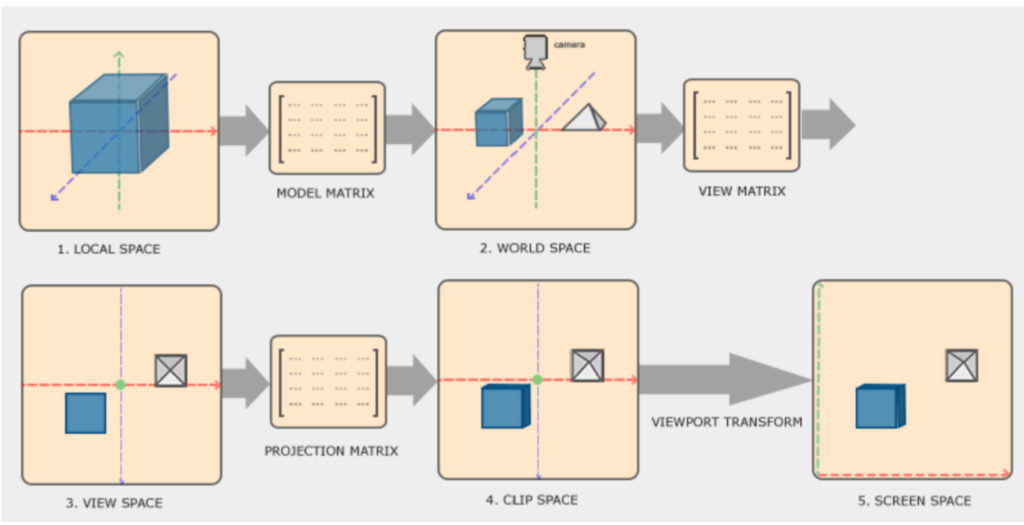
World position to overlay pixels. Returns `null` when the point is behind the camera. Points off
to the side still project, to coordinates outside the screen.
 ```ts theme={null}
on("render", () => {
const pos = render.worldToScreen([0, 0, 64]);
if (pos) render.circleFilled(pos, 3, "#ff0");
});
```
Project inside `render`, not on the tick, or boxes lag behind when you turn.
### screenTransform
```ts theme={null}
on("render", () => {
const pos = render.worldToScreen([0, 0, 64]);
if (pos) render.circleFilled(pos, 3, "#ff0");
});
```
Project inside `render`, not on the tick, or boxes lag behind when you turn.
### screenTransform
```ts theme={null}
render.screenTransform(point: Vec3Like): Vector2 | null
```
Same as `worldToScreen`, but in normalized device coordinates: `-1..1` across the screen, y up.
`null` behind the camera.
```ts theme={null}
const ndc = render.screenTransform([0, 0, 64]);
const onScreen = ndc !== null && Math.abs(ndc.x) <= 1 && Math.abs(ndc.y) <= 1;
```
### boundsOf
```ts theme={null}
render.boundsOf(target: EntityRef | { mins: Vec3Like; maxs: Vec3Like }): { min: Vector2; max: Vector2 } | null
```
The screen rectangle around an entity's collision bounds, or around a world box. Returns `null`
when the entity is gone or has no bounds, or when any corner is behind the camera.
```ts theme={null}
on("render", () => {
for (const pawn of entities.getPlayers({ skipLocal: true })) {
const box = render.boundsOf(pawn);
if (box) render.rect(box.min, box.max, "#ff4040");
}
});
```
***
## Example
Boxes and health bars for enemies. Logic on the tick, drawing in `render`.
```ts theme={null}
import entities from "@native/entities";
import render from "@native/render";
let enemies: IPlayerPawn[] = [];
on("tick", () => {
const me = entities.getLocalPlayer();
enemies = me ? entities.getPlayers({ skipLocal: true }).filter((p) => p.m_iHealth > 0 && p.isEnemy(me)) : [];
});
on("render", () => {
for (const pawn of enemies) {
const box = render.boundsOf(pawn);
if (!box) continue;
const hp = Math.clamp(pawn.m_iHealth / 100, 0, 1);
const top = Math.lerp(box.max.y, box.min.y, hp);
render.rect(box.min, box.max, "#ff4040", { thickness: 1.5 });
render.rectFilled([box.min.x - 5, box.min.y], [box.min.x - 2, box.max.y], [0, 0, 0, 160]);
render.rectFilled([box.min.x - 5, top], [box.min.x - 2, box.max.y], Color.green());
}
});
```